

Most people hire a virtual assistant to “help with admin.” That vague goal creates vague work, weak results, and a new stress loop: you manage someone without a system.
A strong virtual assistant generates ROI by owning workflows that protect your focus and prevent revenue leaks.
Key Takeaways
- A virtual assistant generates ROI through workflow ownership, not task help.
- Connect VA work to business outcomes: lead lifecycle, conversion rate, retention, and LTV.
- Run work through a stack: Slack for chat, ClickUp for commitments, Google Drive for files.
- Start fractional: 5 hours a week can remove your highest-friction bottleneck.
- Design asynchronous communication: Microsoft found employees get interrupted every two minutes by “a meeting, email, or notification.”
- Install a trust protocol: least-privilege access, password managers, and spend controls for high-risk workflows.
- Blend human and AI: a VA can turn your voice notes into drafts with ChatGPT, then apply context and judgment.

Why this matters now
Your day breaks into fragments. Those fragments kill deep work, then force late-night catch-up. Microsoft reports that employees using Microsoft 365 get interrupted every two minutes by “a meeting, email, or notification.”
Hiring in-house can add capacity, but it also adds overhead. The Bureau of Labor Statistics reported benefits made up 29.8% of employer compensation costs for private industry workers in June 2025. You pay more than salary, and you also manage more than tasks.
A virtual assistant gives you a flexible option, but the model only works when you design delegation like an operating system. Next, we will define what a virtual assistant does with clear scope and measurable output.
What does a virtual assistant do, explained clearly
A virtual assistant supports your business remotely by owning repeatable execution and coordination work. They operate inside your tools, follow SOPs, and report progress against a scorecard. They can work freelance, agency-managed, or as fractional support.
People search what is a virtual assistant because they want clarity on scope. The market splits into role types with different skill attributes and ROI levers.
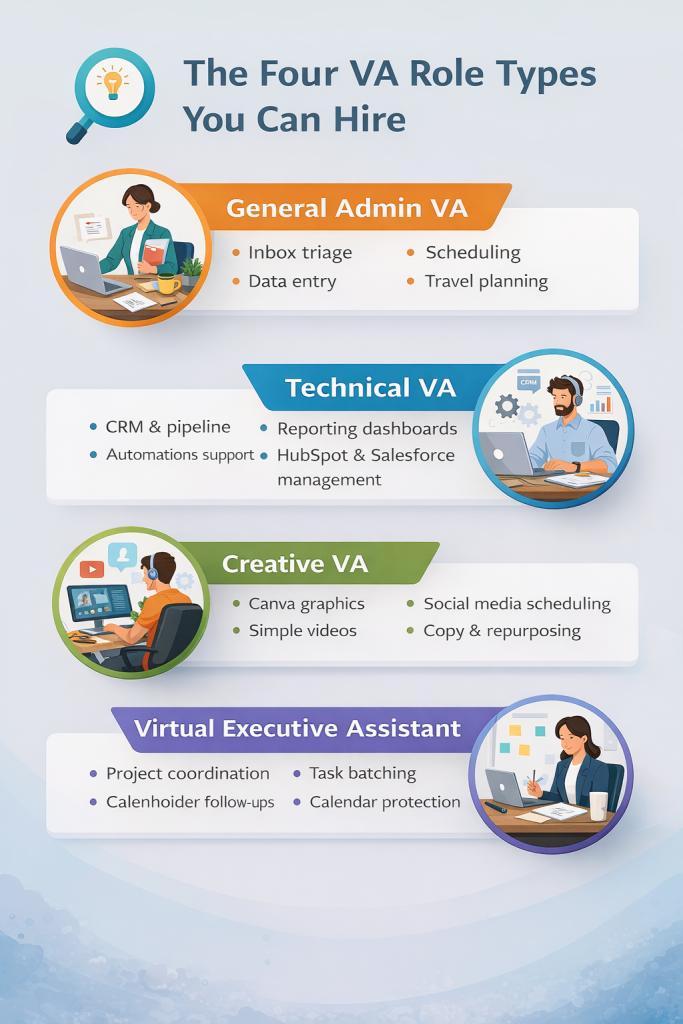
The four VA role types you can hire
General Admin VA
They run inbox triage, scheduling, data entry, document formatting, travel planning, meeting notes, and follow-ups.
Technical VA
They manage systems and data: CRM hygiene in HubSpot or Salesforce, pipeline tagging, automations support, reporting dashboards in Google Sheets.
Creative VA
They run content operations: Canva assets, post scheduling, repurposing, basic edits, social media reporting.
Virtual Executive Assistant (VEA)
They operate as a fractional Chief of Staff: project coordination, task batching, stakeholder follow-ups, calendar protection.
Attribute depth: turn “tasks” into business outcomes
Most articles list tasks. Strong operators map tasks to revenue logic.
Take “CRM hygiene” as an example:
- A VA captures every lead, tags source, and enforces follow-up timing inside HubSpot.
- That improves lead lifecycle execution: lead intake, nurture, booking, close, retention.
- That raises conversion and protects LTV because fewer leads go cold and fewer customers churn from missed communication.
That chain fits under Revenue Operations: people + process + tools that prevent revenue leaks across the funnel.

What a VA should not replace
A VA can coordinate and document, but you should keep regulated judgment with qualified professionals.
Use three buckets:
- Execution: follow a checklist, update a system, send a follow-up.
- Coordination: chase inputs, manage handoffs, maintain one source of truth.
- Judgment: diagnose, prescribe, approve compliance decisions, sign regulated filings.
A VA thrives in execution and coordination. You control judgment through approvals and escalation rules.
The tool stack that makes remote work feel simple
A VA runs faster with a clean stack:
- Communication: Slack, Microsoft Teams, Zoom
- Project management: Asana, Trello, ClickUp, Monday.com
- Files: Google Workspace, Dropbox
- Scheduling: Calendly
- Security: 1Password or LastPass
One rule prevents chaos: keep commitments in a project tool. Keep quick questions in chat.
Human plus AI hybrid
A VA does not compete with AI. A VA directs AI.
A high-output flow looks like this:
- You send a voice note with context.
- The VA drafts an email or SOP using ChatGPT.
- The VA checks facts against your CRM and voice guide.
- The VA routes the draft for approval and schedules follow-ups.
This hybrid reduces cognitive load while keeping accountability human.
Now we move from definition to installation. You will not “try a VA.” You will install a delegation system.
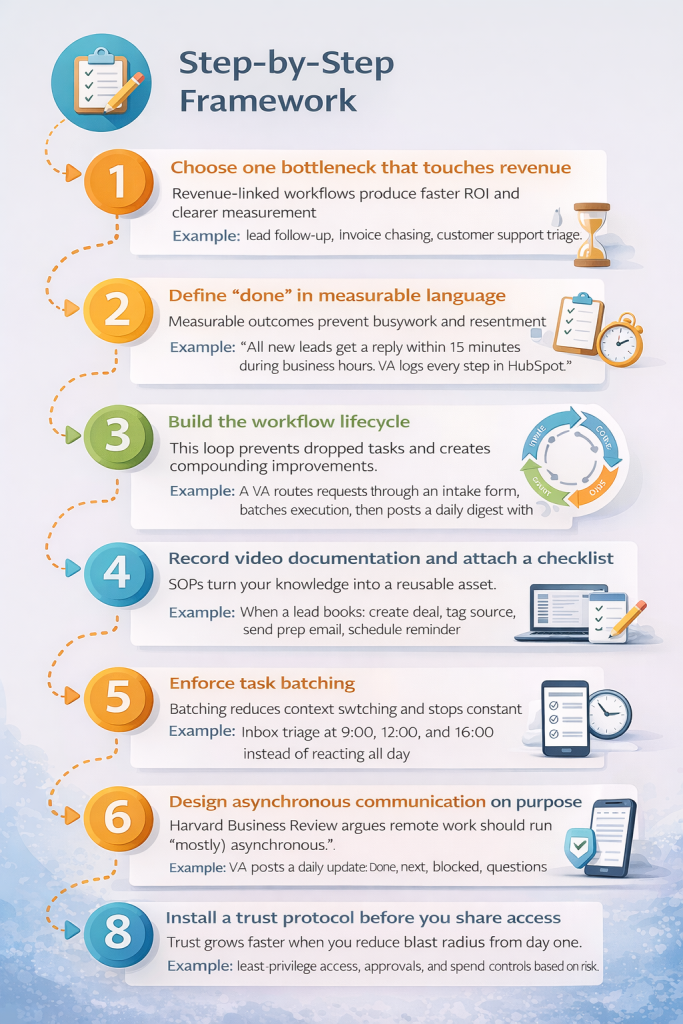
Step-by-step framework
1) Choose one bottleneck that touches revenue
Execution step: Pick one workflow that leaks time or money each week.
The logic: Revenue-linked workflows produce faster ROI and clearer measurement.
Example: lead follow-up, invoice chasing, customer support triage.
2) Define “done” in measurable language
Execution step: Write a definition of done with timing and outputs.
The logic: Measurable outcomes prevent busywork and resentment.
Example: “All new leads get a reply within 15 minutes during business hours. VA logs every step in HubSpot.”
3) Build the workflow lifecycle
Run most VA work through this loop:
Intake → Triage → Execute → QA → Report → Improve
The logic: This loop prevents dropped tasks and creates compounding improvements.
Example: A VA routes requests through an intake form, batches execution, then posts a daily digest with blockers.
4) Record video documentation and attach a checklist
Execution step: Record a screen-capture tutorial once, then link it inside the task.
The logic: SOPs turn your knowledge into a reusable asset.
Example: “When a lead books: create deal, tag source, send prep email, schedule reminder.”
Read more: How to Build SOPs That Scale
5) Enforce task batching
Execution step: Batch similar work into time blocks.
The logic: Batching reduces context switching and stops constant pings.
Example: Inbox triage at 9:00, 12:00, and 16:00 instead of reacting all day.
6) Design asynchronous communication on purpose
Execution step: Replace most meetings with written updates and short recordings.
The logic: Harvard Business Review argues remote work should run “(mostly) asynchronous.”
Example: VA posts a daily update: done, next, blocked, questions.
7) Add time tracking when billing or compliance demands it
Execution step: Track time and categorize it by workflow.
The logic: Time tracking gives you proof-of-work, pricing clarity, and improvement signals.
Example: You spot that customer support consumes 60% of VA time, then you fix the top three repeat issues.
Hubstaff, for example, supports time tracking with optional screenshots to add context to tracked work.
8) Install a trust protocol before you share access
Execution step: Apply least-privilege access, approvals, and spend controls based on risk.
The logic: Trust grows faster when you reduce blast radius from day one.
The ICO states: “Whenever a controller uses a processor, there must be a written contract (or other legal act) in place.” Use that mindset when a VA touches personal data, client files, or patient communications.
Trust Protocol Table
| Risk Level | Access Protocol | Recommended Tool |
|---|---|---|
| Low (Social Media, Research) | Shared login via password manager | 1Password / LastPass |
| Medium (Email, CRM, Calendar) | Least-privilege and role-based access | Google Workspace / HubSpot |
| High (Banking, Payments, HR) | Approval-only and spend controls with virtual cards | Ramp / Mercury / Brex |
Ramp supports customizable controls on virtual cards, including spending limits and restrictions.
Brex documents spend limits, approvals, and use of virtual cards for controlled spending.
Mercury documents card spend policies for controlling team spend.
9) Run a two-week pilot with a scorecard
Execution step: Track 3 to 5 metrics tied to outcomes.
The logic: Scorecards replace gut feel with reality.
Example metrics: response time, appointments booked, tickets closed, invoices sent, posts published.
Now you can choose the right VA role based on your constraints, not on vague hope.
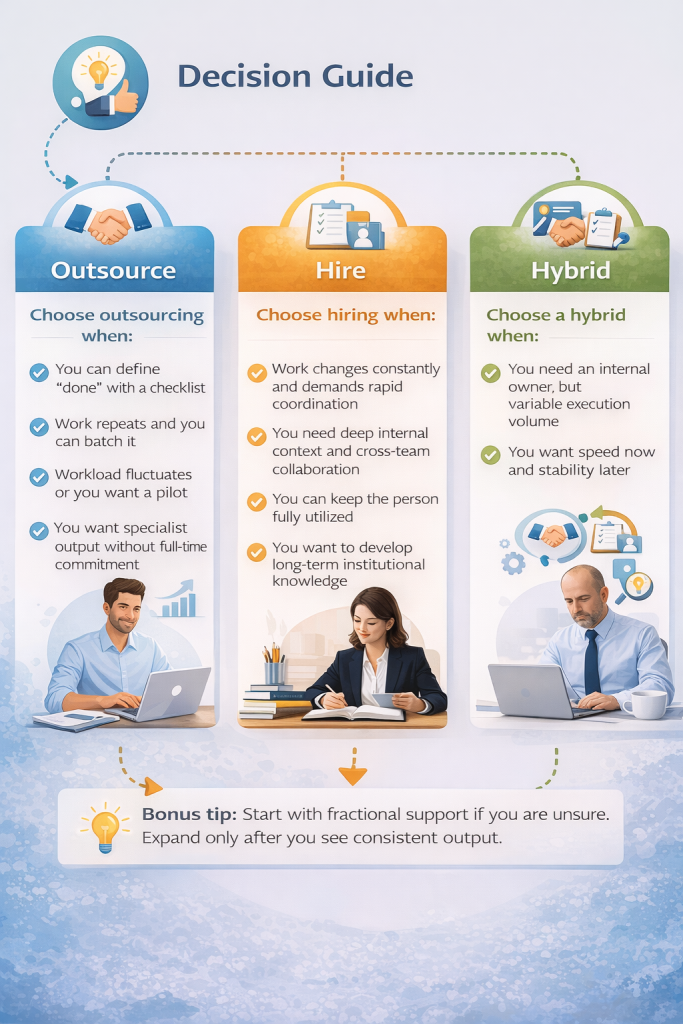
Decision guide
If you feel overwhelmed and behind
Start with a virtual administrative assistant scope. When people ask what does a virtual administrative assistant do, they want inbox control, calendar control, and follow-up control.
Choose this when:
- you miss leads because replies run late
- you lose time hunting for files and threads
- you live in reactive mode
First workflow: inbox triage with clear escalation rules.
If you want growth without payroll fear
Choose fractional support first.
Choose this when:
- workload fluctuates week to week
- you want flexible capacity without a full-time commitment
- you want a low-risk pilot that builds trust fast
Upwork cites a median hourly rate of $13 for virtual assistants and a typical range of $10 to $20 per hour. Use that range for rough budgeting, then price based on responsibility and outcomes.
If you want more leads from the same marketing spend
Choose a Technical VA who understands lead lifecycle.
They can own:
- lead intake and enrichment
- tagging and follow-up sequences
- pipeline cleanup and reporting
This role supports Revenue Operations by preventing leaks between inquiry and booked call.
If you need customer experience to stop slipping
Yes, a VA can run customer service with a playbook.
They can own:
- ticket triage inside your helpdesk
- refunds and shipping updates based on rules
- review responses with escalation paths
A clear escalation path matters more than personality.
If you need consistent content output
Yes, a VA can support social media and digital marketing when you scope work around a content system.
A Creative VA can own:
- weekly content calendar production
- Canva asset creation
- scheduling and repurposing
- weekly metrics reporting
You keep strategy and approvals. VA runs cadence.
What does a real estate virtual assistant do?
They protect your pipeline:
- lead follow-up and appointment booking
- listing coordination and checklist management
- transaction admin tracking and client updates
- CRM hygiene and reactivation campaigns
Speed and consistency win deals in real estate. A VA can supply both.
What does a virtual medical assistant do?
They support clinic admin workflows: scheduling, reminders, intake coordination, insurance admin support, inbox triage. They must follow stricter access control and documentation discipline.
People also ask what does a medical virtual assistant do. The scope overlaps, but the risk profile rises, so the trust protocol must tighten.
Now we will cover the failure modes that break delegation even when the VA has talent.
Common mistakes and fixes
1) You hire a role instead of a workflow owner
Fix: hire for one owned workflow with measurable outputs.
If ignored: you pay for motion and still feel stuck.
2) You push tasks through chat all day
Fix: move commitments into ClickUp, Asana, Trello, or Monday.com.
If ignored: you lose tasks and rebuild work from memory.
3) You skip lead lifecycle mapping
Fix: define stages, tags, and follow-up rules inside your CRM.
If ignored: leads fall through cracks, conversion drops, CAC waste rises.
4) You leave quality undefined
Fix: add a QA checklist for each workflow.
If ignored: you rewrite everything and blame the VA for missing rules.
5) You share access without boundaries
Fix: apply the trust protocol table and least-privilege access.
If ignored: anxiety rises, trust collapses, and delegation stalls.
6) You replace management with meetings
Fix: run async updates and one weekly planning session.
If ignored: interruptions multiply and focus disappears.
7) You measure activity instead of outcomes
Fix: track a scorecard tied to results, and track time only when it serves billing or improvement.
If ignored: you create surveillance tension and still miss targets.
8) You expand scope too fast
Fix: add one workflow after two stable weeks.
If ignored: quality drops and rework grows.
9) You ignore contracts when personal data enters the workflow
Fix: use a written contract and confidentiality requirements for processor work.
If ignored: you create avoidable compliance exposure and client trust risk.
Now let’s make it real with examples you can picture.
Mini case studies
Case 1: The inbox bottleneck that killed sales
A founder scanned email all day and still missed leads. They hired a General Admin VA and installed one rule: triage into Urgent, Today, Waiting, Archive. VA moved every commitment into ClickUp and posted a daily digest in Slack.
The founder stopped scanning and started selling in the morning again.
Case 2: The real estate agent who stopped leaking warm leads
An agent relied on memory for follow-ups and lost deals to faster responders. They hired a real estate virtual assistant to own lead lifecycle: respond fast, tag source, book the call, send reminders, log outcomes.
The agent gained fewer lost opportunities first. That win built trust. Then they delegated listing checklists and transaction admin.
Case 3: The clinic that needed support without chaos
A clinic needed scheduling and inbox support but feared privacy mistakes. They hired a virtual medical assistant, limited permissions, enforced SOPs, and used written processor-style terms for data handling.
They outsourced coordination and kept clinical judgment in-house. The front desk recovered breathing room without loosening control.

What does a virtual assistant do day to day?
A virtual assistant manages communication triage, task batching, system updates, follow-ups, and progress reporting using a scorecard.
What is a virtual assistant?
A virtual assistant is a remote worker who provides operational support using tools like Slack, Zoom, Google Workspace, and project management platforms.
What do virtual assistant services include?
Virtual assistant services include administrative support, customer service, CRM updates, social media content, and basic digital marketing tasks. Scope determines service type.
What does a virtual administrative assistant do?
A virtual administrative assistant manages inboxes, calendars, follow-ups, documents, vendor coordination, and CRM updates to reduce operational distractions.
What does a real estate virtual assistant do?
A real estate virtual assistant handles lead follow-up, appointment scheduling, listing workflows, transaction tracking, and CRM maintenance to keep sales pipelines active.
What does a virtual medical assistant do?
A virtual medical assistant supports appointment scheduling, patient reminders, intake coordination, and administrative workflows with strict privacy protocols.
What does a medical virtual assistant do?
A medical virtual assistant performs the same core tasks as a virtual medical assistant, with emphasis on workflow accuracy, privacy compliance, and escalation procedures.
How much does a virtual assistant cost?
A virtual assistant typically costs between $10 and $20 per hour. Upwork reports a median hourly rate of $13.
How do I manage someone I cannot see?
Manage a virtual assistant using a project management tool, enforce task batching, require asynchronous updates, and review progress through a weekly scorecard.
Do I need contracts and compliance language?
A written contract is required when a virtual assistant processes personal data. The contract must define processor roles and include confidentiality terms, per ICO guidelines.
Next step
You now know what does a virtual assistant do when you hire with outcome clarity and trust controls: they protect your time, stabilize workflows, and reduce revenue leaks across lead lifecycle, customer service, and content ops.
Book a free consultation with Aristo Sourcing. We will map your first workflow, define measurable outcomes, apply the right trust protocol, and match you with the right level of virtual assistant support for your tools and goals.
