

Most small business owners who lose control after outsourcing don’t lose it because they hired the wrong person. They lose it because they treated outsourcing as a hands-off deletion rather than a structured delegation. The work left the building. The process visibility stayed at zero. The residual management load, the volume of questions, interruptions, and corrections the founder still handles daily, barely dropped. Two months in, the founder manages both the output and the person delivering it.
That’s the control paradox. The founder wanted to step back. Without a proper operator layer in place before day one, every outsourcing attempt just moves the chaos from task execution to task supervision. The hire didn’t fail. The infrastructure did.
This checklist solves the infrastructure problem, not the talent problem. Founders who install these guardrails before handing off a single workflow consistently report shorter onboarding timelines, fewer interruptions, and measurably cleaner output within the first 30 days. Those who skip this step rebuild it reactively, usually after something breaks, a missed deadline, a client issue, or a data access incident that could have been prevented.
The five phases below apply to any outsourcing engagement: deploying a social media VA, bringing on a customer support specialist, or handing recurring operations to a remote coordinator.

The Pre-Delegation Infrastructure
Before any remote team member logs into a single tool on your behalf, the technical guardrails need to be live. This isn’t bureaucracy. It’s the difference between outsourcing that reduces founder drag and outsourcing that introduces a new category of risk alongside a modest productivity gain.
Access Control: RBAC and Least-Privilege Architecture
The most common access mistake in small business outsourcing is sharing admin credentials for convenience. That single decision creates permanent data exposure risk the moment an engagement ends and hands a remote team member access far beyond what their role requires.
The standard to implement is Least-Privilege Access (LPA): each remote team member receives access only to the specific tools and data their role requires, and nothing beyond it. Role-Based Access Control (RBAC) extends this by tying permission levels to defined roles rather than individuals. When a team member leaves, you revoke a role, not a manually assembled list of individual permissions scattered across six platforms.
In practice, this means setting up dedicated team member accounts inside your existing tools rather than sharing owner logins. Google Workspace lets you assign specific Drive folder access by user and restrict Gmail delegation to defined inboxes. HubSpot’s permission tiers let you grant CRM view-only access while blocking deal editing, pipeline management, or contact deletion. Asana, ClickUp, and Monday.com all support granular role assignments that separate task visibility from administrative control.
For credential sharing specifically, 1Password Teams and LastPass Business both allow you to share login access without exposing the raw password. The team member authenticates. They cannot copy, export, or screenshot the credential. When the engagement ends, you revoke their vault access and the credential remains protected without requiring a password reset across every platform.
During the first 14 days of any new engagement, set all CRM and database permissions to view-only. This is a calibration period, not a trust signal. It lets you verify the team member’s workflow interpretation before granting write access to live data.
Defining “Done” via Observable Evidence
The largest single cause of outsourcing failure in small businesses is vague instructions. A founder tells a VA to “manage the inbox” or “keep the CRM updated” and wonders why neither task meets their standard. The problem isn’t the instruction: it’s the absence of a measurable, verifiable definition of done.
A task is only safe to outsource when it leaves a verifiable digital footprint. Observable tasks produce evidence the founder can check asynchronously, without requesting a status update, joining a call, or reviewing someone’s screen. Reversible tasks can be corrected if the team member gets the execution wrong, without permanent data loss or client-facing consequences.
The practical difference looks like this:
Instead of “manage my inbox,” write: “Inbox triage complete by 11:00 AM daily. Messages sorted by the existing priority label system. All emails requiring a founder decision carry the ‘Founder Action’ label. Zero unread messages in the primary inbox by end of business.”
Instead of “update the CRM,” write: “Every new inbound lead enriched with firmographic data, company size, and source tag within 30 minutes of entry. Deals advance to ‘Discovery Scheduled’ status only after a calendar invite has been confirmed and logged against the contact record.”
Both instructions describe the same task. One creates process visibility. The other creates residual management load because the founder checks whether the task was done correctly every single time.
The one-page playbook capturing this definition of done builds around four pillars: the inputs required to start the task, the execution steps in exact sequence inside the exact tools, the output definition with acceptance criteria, and the escalation path for edge cases. A team member running a well-built playbook should not need to ask the founder a question to complete the task correctly.
The Communication Blueprint
The fastest way to recreate the bottleneck you were trying to remove is to use live chat as your primary task management channel. Slack and WhatsApp are real-time communication tools. When founders assign tasks, answer process questions, and follow up on deliverables through chat, they become the coordination layer that a well-built system should eliminate entirely.
The communication architecture for outsourcing should separate task management from messaging.
Task management lives inside the project management tool. Asana, ClickUp, and Monday.com all support structured task records with due dates, output definitions, attachment fields for proof of completion, and status tracking. Every task the remote team member works on exists as a record in the tool, not buried in a chat thread. The founder reviews the project board to check progress, not their messages.
Synchronous communication handles two things only: resolving ambiguity the SOP didn’t anticipate, and reviewing the weekly scorecard together. Everything else runs asynchronously. The team member posts a daily status update in a designated channel covering what’s done, what’s in progress, and what’s blocked. The founder reads it at a time of their choosing. The workflow doesn’t wait.
The weekly scorecard replaces ad-hoc check-ins entirely. Three to five metrics, agreed during onboarding and tracked in a shared dashboard, give the founder an objective picture of engagement performance. One speed metric (response time or turnaround time), one quality metric (error rate or accuracy score), and one business output metric (lead response time, ticket backlog, or content publish rate) covers most small business outsourcing engagements. When the numbers are green, no additional review is needed. When a metric dips, the founder has a specific data point to address, not a vague feeling that something is off.
This structure also creates the audit trail that protects the founder if something goes wrong. Every decision, output, and escalation lives in the project management tool and the scorecard, not in someone’s memory or a deleted chat thread.
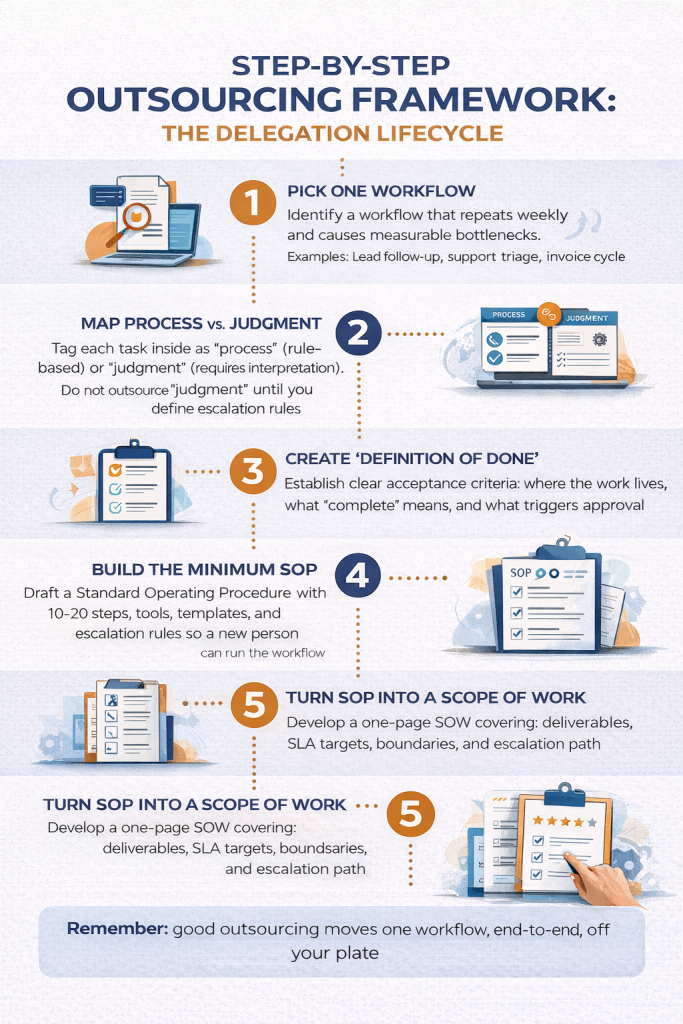
The 5-Step Outsourcing Control Checklist
Outsourcing Readiness Diagnostic
Summary
| Checklist Item | Current State | Risk Level | Remediation Step |
|---|---|---|---|
| Classification | Utility | Low | Eligible for delegation. |
| Access | Shared | High | Use 1Password/LastPass RBAC. |
| Documentation | Vague | High | Write a 5-step SOP. |
| Communication | Live Chat | Medium | Adopt PM board + Scorecard. |
Step 1: Establish Least-Privilege Access Before Day 1
Map tool access by role, not convenience. Create a dedicated user account for the team member in every tool they’ll use. Apply RBAC where the tool supports it. Share credentials through 1Password Teams or LastPass Business without exposing raw passwords. Set CRM and database permissions to view-only for the first 14 days. Maintain a simple access log documenting which tools the team member can access and at what permission level. This log becomes the offboarding checklist when the engagement ends.
Step 2: Build a One-Page Playbook SOP Creation
Document the target workflow around four pillars: inputs (what triggers the task), execution steps (the exact sequence in the exact tools), output definition (what done looks like with verifiable evidence), and the escalation path (what the team member does when they encounter something the playbook doesn’t cover). Keep it to one page. If it runs longer, split it into two separate playbooks, each covering a single workflow.
Step 3: Isolate Utility Work from Advantage Work Task Selection
Audit your weekly schedule and tag every recurring task as either utility work, which is rule-based, repeatable, and verifiable, or advantage work, which covers strategic positioning, proprietary methodology, and core client relationships. Optimizing operational capacity through outsourcing means filling your operator layer with utility work exclusively. Advantage work stays in-house permanently, regardless of how time-consuming it is, because it represents the competitive differentiation that makes the business worth building. Any task requiring your specific institutional knowledge, your business judgment, or direct client trust belongs in the second category.
Step 4: Deploy a 30-Day Pilot Scope Onboarding Phase
Start the remote team member on a single, well-documented workflow. Run two structured syncs per week during the first month: one to review output against the playbook’s definition of done, one to identify SOP gaps. Log all performance feedback directly inside the project management tool, not in chat. At day 30, review the scorecard before adding any new workflows to the scope. Scope expansion follows consistent performance, not optimism.
Step 5: Transition to Scorecard Management Scale and Control
Shift from tracking hours to tracking data. Set three primary metrics on a shared dashboard: a speed metric, a quality metric, and a business output metric. Review the scorecard weekly. Expand scope only after the workflow runs clean against all three metrics for 30 consecutive days. For engagements involving workflow automation or AI-assisted task processing, maintain human-in-the-loop validation checkpoints to catch data drift before it compounds. Automated processes can fail silently. A structured weekly review catches issues a passive check-in misses.
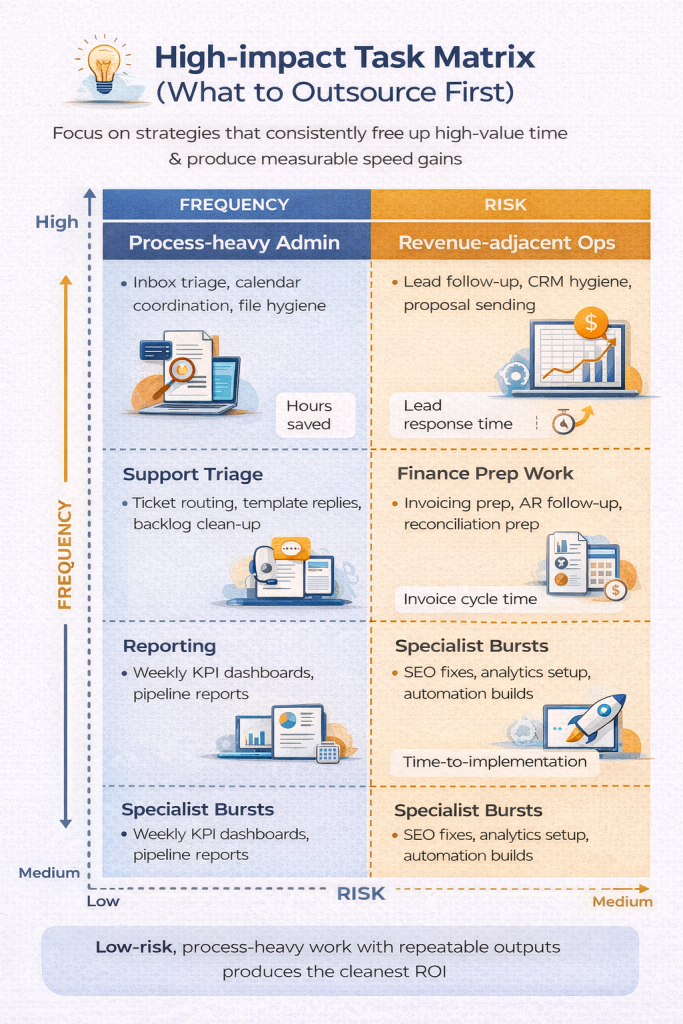
What Never Goes on the Outsourcing List
Your business’s core competency and proprietary methodology stay in-house. This is not a trust issue. It’s a strategic protection issue. The tasks that define your competitive differentiation cannot sit on a delegation checklist regardless of how well-documented they are, because the moment they leave the business’s control, so does the advantage they represent.
Pricing and positioning decisions, vendor selection for business-critical systems, cash movement approvals, contract negotiations, and the strategic relationships that generate your highest-value clients all belong in this category. Deploying specialized remote staff to own the utility layer protects the founder’s time for these decisions, which is the whole point. A well-built outsourcing infrastructure doesn’t just save hours. It creates the focused capacity to do the high-judgment work that no playbook can replace.
Outsourcing Control: Quick Reference Matrix
| Control Area | High-Control Setup | Low-Control Trap |
|---|---|---|
| Data Security | RBAC-based permissions; credential sharing via 1Password or LastPass without raw password exposure | Shared root passwords; unrestricted admin access granted on day one for convenience |
| Task Direction | Written output definitions with observable evidence and acceptance criteria inside the project management tool | Vague verbal instructions or ad-hoc chat messages with no documented standard |
| Issue Handling | Documented escalation rules for edge cases inside Asana, ClickUp, or Monday.com | Instant founder escalations that recreate the bottleneck in real time |
| Performance Tracking | Weekly scorecard with three to five objective metrics covering speed, quality, and business output | Subjective assessment based on whether the engagement “feels productive” |
| Communication | Async-first task management in the project tool; live calls for ambiguity resolution and scorecard review only | Slack or WhatsApp as the primary task channel; live coordination required for every update |
| Access Management | Least-Privilege Access with a documented access log; view-only permissions during the 14-day calibration period | Full admin access granted from day one; no offboarding checklist in place |
he Checklist Is Ready. The Question Is Who Runs It.
You now have the infrastructure framework: access controls, playbooks, scorecard management, and a clear separation between utility work and the strategic work that stays with you. The system works. What most founders discover next is that building it was the straightforward part. Running it consistently, every day, across every active workflow, is where the time cost returns.
That’s where Aristo Sourcing comes in. Our virtual assistants onboard directly into your existing tools, operate inside the guardrails you set, and own the execution layer your business needs without requiring you to manage every detail of how it runs.
One workflow. One VA. Thirty days to see whether the system holds.
Talk to the Aristo Sourcing team about which workflow to start with and what the first 30 days of a controlled delegation looks like for your business.

How long until outsourcing creates real ROI?
Outsourcing creates real ROI within 2 weeks when the workflow is defined, examples are provided, and a consistent cadence is enforced. Stable ROI occurs when the SOP no longer changes daily and the KPI improves weekly.
What is the fastest way to reduce outsourcing risk?
The fastest way to reduce outsourcing risk is by using a paid test task, limiting access with least-privilege permissions, and requiring approval for actions involving money, contracts, or user administration.
What should I ask an outsourcing partner to prove competence?
Ask an outsourcing partner to describe their process for scope definition, test tasks, reporting cadence, access control, and offboarding to prove competence. Vendor management maturity is as critical as labor delivery.
References
Asana (2026) Project Management for Distributed Teams. Asana Inc. [Online] Available at: https://asana.com [Accessed June 2026].
ClickUp (2026) ClickUp for Operations and Remote Workflows. ClickUp Inc. [Online] Available at: https://clickup.com [Accessed June 2026].
Deloitte (2024) Global Outsourcing Survey 2024. Deloitte Consulting LLP. [Online] Available at: https://www2.deloitte.com/global/en/pages/operations/articles/global-outsourcing-survey.html [Accessed June 2026].
Harvard Business Review (2023) ‘Think Outsourcing Eases Leadership Burdens? Think Again.’ Harvard Business Review. [Online] Available at: https://hbr.org [Accessed June 2026].
IBM Security (2025) Cost of a Data Breach Report 2025. IBM Corporation. [Online] Available at: https://www.ibm.com/reports/data-breach [Accessed June 2026].
LastPass (2026) Business Password Management and Access Control. LastPass. [Online] Available at: https://www.lastpass.com/business [Accessed June 2026].
Monday.com (2026) Work Operating System for Business Operations. Monday.com Ltd. [Online] Available at: https://monday.com [Accessed June 2026].
NIST (2024) Least Privilege Principle: Guide to Enterprise Security Architecture. National Institute of Standards and Technology. [Online] Available at: https://csrc.nist.gov/publications [Accessed June 2026].
1Password (2026) 1Password Teams: Shared Credential Management. 1Password. [Online] Available at: https://1password.com/teams [Accessed June 2026].
