

Most owners attack a backlog by “catching up” on categories. That move produces tidy screens and unreliable numbers.
Run triage instead. Reconcile first, then map transactions to your Chart of Accounts, then review the reports you rely on for cashflow, taxes, and decisions.
Key Takeaways
- Treat backlog cleanup like incident response, not admin work.
- Pause broken bank feeds and app syncs before you touch anything else.
- Reconcile month by month to bank and card statements to lock reality.
- Map transactions to the Chart of Accounts with vendor standards and bank feed rules.
- Use an exception list so you only spend judgment where it matters.
- Review Profit & Loss and Balance Sheet last, then validate A/R, A/P, and Undeposited Funds.
- Install a weekly cadence so the backlog never returns.
In real cleanups, the backlog is rarely just ‘uncategorised transactions.’ It is duplicated bank feeds, payout processors that do not tie out cleanly, and months where the books look fine until you hit Undeposited Funds and clearing accounts.

Why this matters now
A backlog rarely stays “just bookkeeping.” It delays year-end tax prep, muddies cashflow, and turns simple questions into guesses. You stop trusting the General Ledger, so you stop using it.
Time pressure makes this worse. Intuit reports that respondents spend 25 hours per week on manual data entry or reconciling data across apps. That time often produces activity without clarity.
Tool sprawl also fuels backlogs. The same Intuit survey reports that businesses use 10 different digital business solutions on average, which increases sync risk when teams lack strong controls.
You need speed, but you also need a clean audit trail. The next section explains the triage model that restores trust first.
The core concept explained clearly
Backlogs form when your finance system loses stability. You usually face one of these problems:
- A bank feed reconnect pulled history twice.
- A payment processor posted net deposits without fee detail, or posted duplicates.
- A bookkeeper classified without reconciling.
- Your Chart of Accounts turned into a junk drawer.
- The owner became the bottleneck for every ambiguous transaction.
Triage fixes this with one rule: anchor reality before you organize. QuickBooks recommends matching bank statements to ledger entries to keep accounts aligned, so this guide starts there.
What backlog screens usually look like
You will likely recognize at least two of these:
- 600+ uncategorized transactions
- duplicated months after a bank feed reconnect
- Undeposited Funds climbing every month
- negative balances in A/R or A/P
- owner draws mixed with business expenses
- “Ask My Accountant” used as a dumping ground
- apps posting into the wrong accounts
Your cleanup wins or fails based on order. The next section gives you the sprint.
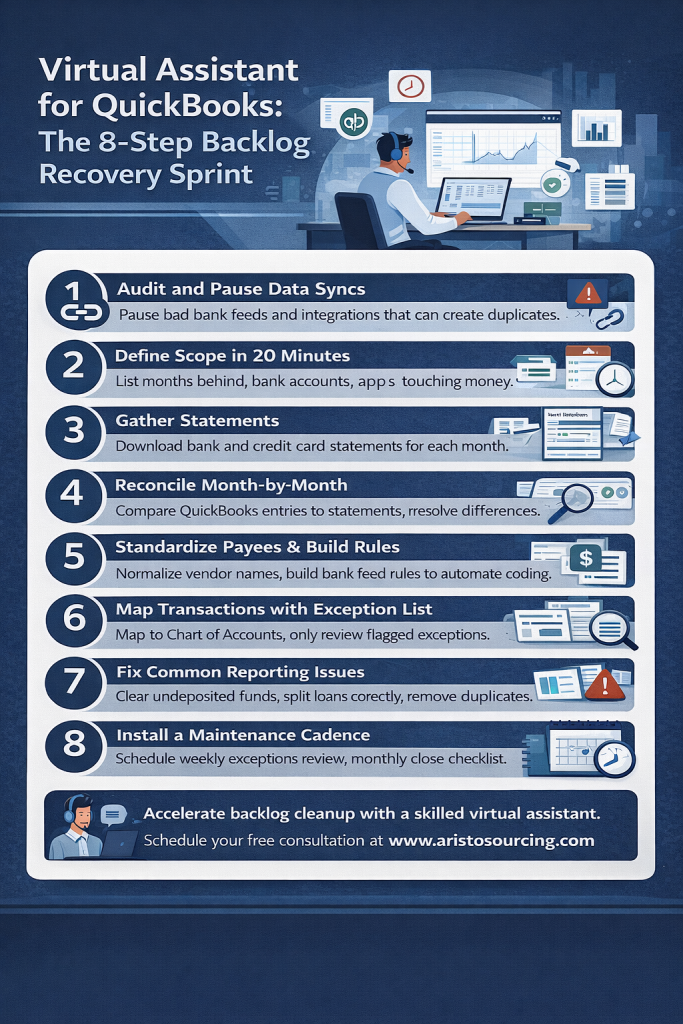
Virtual assistant for QuickBooks: The 8-step backlog recovery sprint
A trained virtual assistant can run most steps inside QuickBooks Online, while you approve exceptions and your accountant handles tax-sensitive calls. This sprint aims for fast progress without reckless edits.
1) Audit and pause data syncs
What to do: Stop new bad data from entering the books.
- Pause bank feed reconnect attempts.
- Pause integrations that create duplicates or post to the wrong accounts.
- Stop CSV imports that overlap with bank feeds.
QuickBooks Online uses bank feeds and app integrations differently from QuickBooks Desktop. Desktop cleanups often require file access and a different handoff rhythm. The cleanup steps stay the same, but the tooling and permissions change.
Why it matters: Every new duplicate adds rework across reconciliation and reporting.
Quick example: You reconnect a bank feed and QuickBooks downloads six months again. You now see doubled deposits and charges inside that window. Pause the feed before cleanup.
2) Define scope in 20 minutes
What to do: Build a one-page scope sheet.
- Months behind
- Bank accounts and credit cards
- Payment processors (Stripe, PayPal, Square)
- Payroll platform
- Sales method (invoices, sales receipts, POS)
- Bills workflow (bills vs card spend)
Why it matters: Scope drives timeline, risk, and the right staffing mix.
Quick example: Two accounts and one card clean faster than five accounts, three cards, and multiple payout systems.
The reconciliation phase
This phase restores truth. Statements matter more than bank feeds. A virtual assistant can do the work, but the team must follow tight rules.
3) Gather statements and lock the timeline
What to do: Download statements for every month and every account.
- Bank statements
- Credit card statements
- Loan statements if you post payments in QuickBooks
Why it matters: Statements provide the reconciliation truth source. You can recover without bank feeds, but you cannot recover without statements.
People ask: Can I clean a backlog without bank feeds?
Yes. Statements drive reconciliation and protect accuracy.
4) Reconcile month by month, oldest to newest
What to do: Reconcile each account one month at a time.
- Start with the oldest unreconciled month.
- Compare statement lines to QuickBooks lines.
- Clear only the transactions that match the statement.
- Stop and fix differences before you move forward.
QuickBooks describes reconciliation in one clean line: “To reconcile, simply compare the list of transactions on your bank statement with what’s in QuickBooks.”
Why it matters: Reconciliation anchors the General Ledger to bank reality. It also exposes duplicates, missing entries, wrong dates, and bad transfers before they spread.
People ask: What should the reconciliation difference show?
Aim for zero. QuickBooks guidance across regions frames the expected difference at the end as $0.00 (currency varies by locale).
5) Standardize payees and build bank feed rules
What to do: Reduce future workload with rules and standards.
- Normalize vendor names (one payee per vendor).
- Create rules for subscriptions and recurring vendors.
- Add memo standards for ambiguous spend.
- Route unknown vendors into your exception list.
Why it matters: Rules handle the boring 90%. Humans should handle exceptions.
People ask: What should I do with Uncategorized transactions?
Start after reconciliation. Then code with vendor mapping and exception review, not guesswork.
6) Map transactions to the Chart of Accounts using an exception list
What to do: Classify after you complete reconciliation across the backlog window.
- Map income and expenses to the Chart of Accounts.
- Apply Classes or Locations if you track profitability by service line.
- Assign Customers or Projects when you need job-level margin.
Then run an exception list so you avoid slow line-by-line review.
Why it matters: Speed comes from focus. You will not win by debating every $12 transaction.
Sample exception list
- Any transaction above a threshold you set (example: $500)
- New vendors
- Split transactions
- Refunds, chargebacks, reimbursements
- Anything coded to Uncategorized, Suspense, or Ask My Accountant
People ask: How do I avoid wrong categories during cleanup?
Use rules for repeat vendors, then ask the owner only about exceptions. You protect accuracy and protect time.
7) Fix the edge cases that make reports lie
What to do: Clean the problems that distort reporting logic.
- Clear Undeposited Funds by matching deposits to recorded payments.
- Recode transfers so they hit transfer accounts, not expense accounts.
- Split loan payments into principal and interest when needed.
- Remove duplicate bills and duplicate bill payments.
- Confirm payment processor handling so you record fees and refunds correctly.
Why it matters: Edge cases can pass reconciliation and still wreck Profit & Loss categories and Balance Sheet accounts. Double-entry bookkeeping depends on correct account pairing, especially for transfers and liabilities.
People ask: Why does Undeposited Funds keep growing?
You usually recorded payments without matching deposits, or you recorded deposits without matching payments. Batch deposits from processors often trigger this.
8) Review reports and install a maintenance cadence
What to do: Validate the sprint results, then prevent relapse.
- Review Profit & Loss for the backlog period and the most recent month.
- Review Balance Sheet with focus on cash, credit cards, loans, A/R, and A/P.
- Review A/R Aging and A/P Aging for realism.
- Save a close checklist and run it every month.
Why it matters: Recovery means nothing if you recreate the backlog next quarter.
Simple maintenance cadence
- Weekly: bank feed review, receipt capture, exception approvals
- Monthly: reconciliation, close checklist, report review
- Quarterly: Chart of Accounts cleanup, rule refresh, tax readiness check
Once you restore the system, you face the real decision: maintain it yourself or delegate it. The next section helps you choose.
Who should use this sprint?
Use this approach when you:
- Sit 3 to 12+ months behind
- Need trusted numbers for taxes, pricing, hiring, or cash planning
- Want an owner-light workflow instead of constant interruptions
How long will recovery take?
Timeline depends on transaction volume and app complexity. Use this planning range:
- Low volume (under 200 transactions per month): 1 to 3 weeks
- Medium volume (200 to 800 per month): 3 to 6 weeks
- High volume (800+ per month or heavy payout stack): 6 to 10 weeks
If you pause broken syncs early, you shorten the timeline fast. If you keep syncing duplicates, you extend the timeline indefinitely.

What can a virtual assistant do versus an accountant?
Use this scope split to avoid stepping on your accountant’s work.
| Workstream | Virtual assistant can handle | Accountant should handle |
|---|---|---|
| Reconciliation | Statement-based reconciliations, discrepancy logs | Strategy for complex reconciliation issues |
| Classification | Vendor mapping, bank rules, Chart of Accounts mapping under guidance | Chart of Accounts design for tax strategy and reporting |
| Reporting | Close checklist, reporting packs, variance notes | Tax planning, compliance review, year-end sign-off |
| Complexity | A/R, A/P hygiene, cleanup documentation | Payroll liabilities, sales tax, loans, inventory, multi-entity |
When should you avoid a backlog sprint without specialist input?
Bring an accountant or controller in early when you see:
- Inventory accounting
- Multi-entity structure
- Payroll liabilities that never match filings
- Complex sales tax across jurisdictions
- Financing changes that altered loan schedules
A virtual assistant can still support the process, but a specialist should set the rules first.
Common mistakes and fixes
1) You start by categorizing everything
Fix: Start with reconciliation. Lock the month range to statements.
If you ignore it: You create tidy categories built on duplicates and missing deposits.
2) You delete duplicates without finding the source
Fix: Identify the cause: bank feed reconnect, CSV overlap, or app reposting.
If you ignore it: Duplicates return and break the next reconciliation.
3) You let “Ask My Accountant” become a dumping ground
Fix: Replace it with an exception list and a weekly approval habit.
If you ignore it: The backlog never ends. It just changes names.
4) You code transfers as expenses
Fix: Code transfers to transfer accounts and confirm both sides of the move.
If you ignore it: Expenses inflate and profit drops on paper.
5) You ignore Undeposited Funds
Fix: Match deposits to recorded payments and clear the holding account each month.
If you ignore it: Revenue timing drifts and cash visibility collapses.
6) You mix owner draws and business expenses
Fix: Separate owner draws, then stop personal spend at the source.
If you ignore it: Year-end tax prep turns into a forensic project.
7) You skip source docs and receipt capture
Fix: Create one capture channel and one naming rule.
If you ignore it: You lose deductions and waste hours later. The IRS says good records help you “prepare your financial statements” and “support items reported on your tax returns.”
8) You give broad access without controls
Fix: Use least-privilege roles, approval gates, and a password manager.
If you ignore it: You raise fraud risk and block delegation through anxiety.
9) You finish cleanup but skip the close checklist
Fix: Run a monthly close checklist and a short report review routine.
If you ignore it: The backlog returns, even after a strong cleanup sprint.
The next section shows how these fixes play out in real situations.
Mini case studies
Case 1: Six months behind, service business, owner-led books
A founder ran sales and delivery and left QuickBooks untouched for two quarters. Stripe payouts posted, but the team never reconciled months to statements.
The sprint paused payout mapping changes, reconciled each month, then mapped the top vendors to a clean Chart of Accounts. The assistant routed only exceptions to the owner, mainly large purchases and unknown vendors. The owner regained confidence in cash and profit and replaced daily finance stress with one short weekly approval block.
Case 2: Three months behind after a bank feed reconnect
A team reconnected a bank feed and pulled history again. They saw doubled deposits and doubled subscription charges.
The sprint paused the feed, removed duplicates inside the affected date range, then reconciled each month to statements. The assistant normalized payees and built rules for recurring spend. The review phase cleared Undeposited Funds growth from batch deposits, so deposits and revenue aligned again.
Case 3: New ops manager inherits a messy General Ledger
An ops manager inherited a Chart of Accounts with dozens of overlapping categories. Vendor coding changed month to month.
The sprint reconciled first to stabilize balances. Then the manager merged redundant accounts, standardized vendors, and built rules. The accountant reviewed a small set of edge cases, mainly loan splits and payroll posting. The business gained reliable month-end numbers and a repeatable close.
What a Charissa-type bookkeeping VA owns
What your bookkeeping VA owns in this cleanup
- Bank and card reconciliations month-by-month
- Payee cleanup and consistent vendor naming
- Bank rules that reduce miscoding and rework
- Stripe and PayPal mapping (clearing workflow, fees, refunds, chargebacks)
- Undeposited Funds cleanup and prevention
- Weekly exception log and a close pack for review (P&L, Balance Sheet, open items).
Janus (and the bookkeeping VAs we place) sees the same patterns repeatedly. This is the exact ownership split that prevents the backlog from returning.
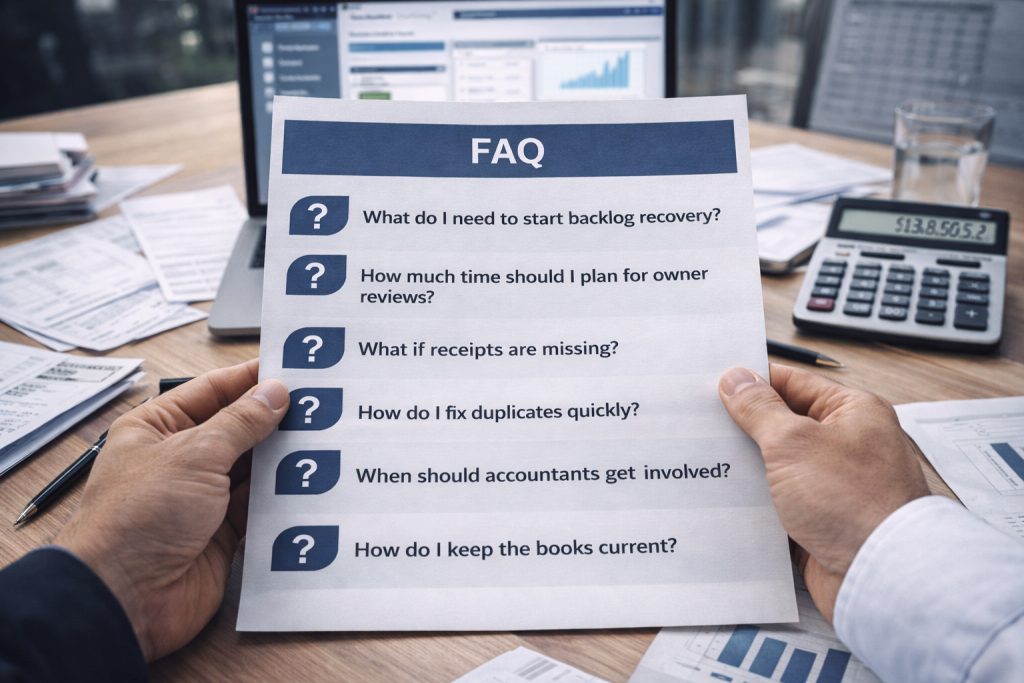
What do I need before a virtual assistant starts?
Bank and credit card statements, QuickBooks access, and a list of connected apps. Set one approval rule, such as “flag anything over $500.”
What permissions level should I give?
Give only the access needed for bookkeeping tasks. Keep banking logins private. Gate bill pay, payroll, and vendor changes behind owner approval.
How much owner time should I plan each week?
Most teams succeed with one 15 to 30 minute weekly exception review. That rhythm prevents constant interruptions.
How do I handle missing receipts during cleanup?
Reconcile first so cash stays correct. Then tag missing-document items for follow-up and accountant review.
How do I fix duplicate transactions fast?
Find the source, then remove duplicates in one controlled pass. Bank feed reconnects and CSV overlaps cause most duplicate waves.
When should my accountant step in?
Loop them in for payroll liabilities, sales tax complexity, loans, inventory, and year-end tax prep decisions.
How do I stop the backlog from returning?
Keep a weekly exception review, reconcile monthly, and run a close checklist. Rules and payee standards keep the workload small.
What does “clean books” mean after the sprint?
Every month reconciles to statements, Uncategorized stays near zero, Undeposited Funds clears, A/R and A/P match reality, and reports support decisions.
Next step
If you want trusted numbers fast, run a Backlog Recovery Sprint with an owner-light workflow. A virtual assistant can reconcile, map transactions to your Chart of Accounts, document exceptions, and install a cadence that keeps QuickBooks current.
Book a free consultation. We will review your backlog scope, estimate a realistic timeline, and set a clean handoff between your assistant and your accountant.
