

Most people calculate the ROI of hiring a virtual assistant by counting “hours saved.” That shortcut misses the biggest lever. Payroll hiring adds an infrastructure tax that drains cash, slows execution, and locks you into fixed costs.
Key Takeaways
- The 30% Rule: Total compensation costs can run close to one-third higher than base salary when you hire on payroll.
- The real ROI comes from turning fixed overhead into variable OpEx you can scale with demand.
- Fractional specialists often beat one overloaded generalist.
- SOPs drive ROI more than talent alone.
- Weekly scorecards protect quality and prevent “busy work.”
- Access controls protect savings from one costly mistake.

Why this matters now
Many businesses run heavy. They carry payroll drag, tool sprawl, and slow hiring cycles. That weight shows up as thin margins and delayed projects, even when revenue looks strong.
A virtual assistant model gives you a different operating shape. You buy output without buying the full employment wrapper. That shift matters most when you want speed, flexibility, and predictable costs.
You need a clean definition of ROI before you run the numbers.
The core concept explained clearly
What does “virtual assistant ROI” actually mean?
ROI compares what you gain to what you spend. For a virtual assistant, you can count return in three buckets:
- Recovered high-value time you redirect into sales, delivery, or strategy
- Cost avoided by skipping payroll overhead and long onboarding lag
- Revenue lift from faster follow-ups, better pipeline hygiene, or improved customer response
You can measure ROI without complex formulas. You just need honest inputs.
Why payroll math tricks smart founders
Payroll hiring pulls more than salary. You pay for benefits, payroll taxes, admin time, and equipment. The Bureau of Labor Statistics reported that benefit costs accounted for 29.8% of employer compensation costs for private industry workers in June 2025.
That figure explains the “ghost overhead” problem. You approve a salary, then the business funds a second layer of cost that never touches output.
OpEx vs CapEx, explained in plain English
Founders often treat hiring like an investment, but payroll often behaves like fixed OpEx (operating expense). OpEx repeats every month and reduces flexibility. CapEx (capital expense) usually buys an asset you keep, like equipment. A virtual assistant usually sits inside OpEx too, but the VA model lets you control the size of that expense with far less friction.
That control creates the return: you keep the company light.
How long does traditional hiring take?
SHRM benchmarking data reported a 44-day median time-to-fill for non-executive roles, with a 54-day average. That timeline often delays follow-ups, projects, and revenue work.
Comparison Table: Traditional vs. VA Scaling
| Expense Category | Traditional Full-Time Hire | Virtual Assistant Model |
|---|---|---|
| Recruitment | High (internal time + fees) | Low (agency-vetted or direct) |
| Onboarding | Weeks | Days (common with vetted talent) |
| Benefits and payroll load | Added overhead | Contract-based billing |
| Equipment | Company-provided | VA-provided (common) |
| Scalability | Rigid | Elastic |
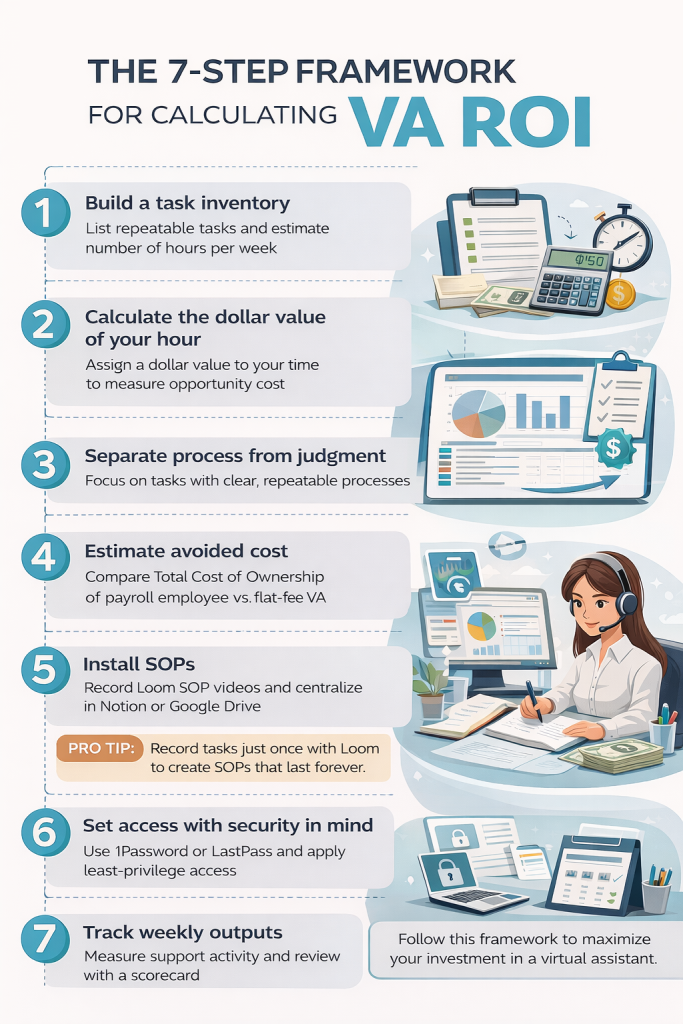
The 7-step framework for calculating VA ROI
1) Build a task inventory that shows volume
What to do: List repeatable tasks you complete every week. Add minutes per task.
Why it matters: ROI needs volume. Low-frequency tasks rarely justify training time.
Quick example: You spend 45 minutes daily on inbox triage. That adds up to about 15 hours per month of delegatable work.
2) Put a dollar value on your hour
What to do: Pick one hourly value for your time, then use it consistently.
Why it matters: Underpricing your time hides ROI and keeps you stuck doing low-value work.
Quick example: You value your hour at $150. A VA frees 10 hours per month. You unlock $1,500 of capacity.
3) Separate “delegation-ready” from “judgment-heavy”
What to do: Tag each task as Process or Judgment.
Why it matters: Process tasks train fast and measure clean. Judgment tasks need context and stronger SOPs.
Quick example: “Update CRM fields after calls” fits Process. “Decide next quarter priorities” fits Judgment.
4) Estimate avoided cost using Total Cost of Ownership (TCO)
What to do: Model the payroll alternative you would have chosen, then calculate its Total Cost of Ownership (TCO).
Why it matters: When calculating the ROI of hiring a virtual assistant, you compare the TCO of a payroll employee versus the flat-fee model of a VA.
Quick example: You budget for a payroll admin hire. SHRM benchmarking data reported average cost-per-hire around $4,683.
That number often surprises founders who only budget for salary.
5) Install SOPs in week one
What to do: Record Loom walkthroughs for the top five tasks and store them in Notion or Google Drive.
Why it matters: SOPs reduce back-and-forth and prevent “outsourced chaos.”
Quick example: You record a 6-minute Loom that shows your email labeling rules, escalation triggers, and response templates.
Pro tip: Record the task once with Loom, then reuse the SOP forever. This single habit often drives the fastest ROI.
6) Set access like an operator, not a hopeful optimist
What to do: Use 1Password or LastPass, follow least-privilege access, and log actions when tools allow it.
Why it matters: One access mistake can wipe out a year of savings.
Quick example: You share credentials through a vault, limit permissions inside your CRM, and keep finance tools restricted.
7) Track outputs weekly with a scorecard
What to do: Pick 3–5 measurable outputs, then review every week.
Why it matters: Output tracking prevents “busy work” and protects quality.
Quick example metrics: follow-ups sent, tickets closed, lead records cleaned, meetings scheduled, response time.
Read more: How to Delegate Safely With Remote Staff
Read more: Hiring Remote A-Players Scorecard
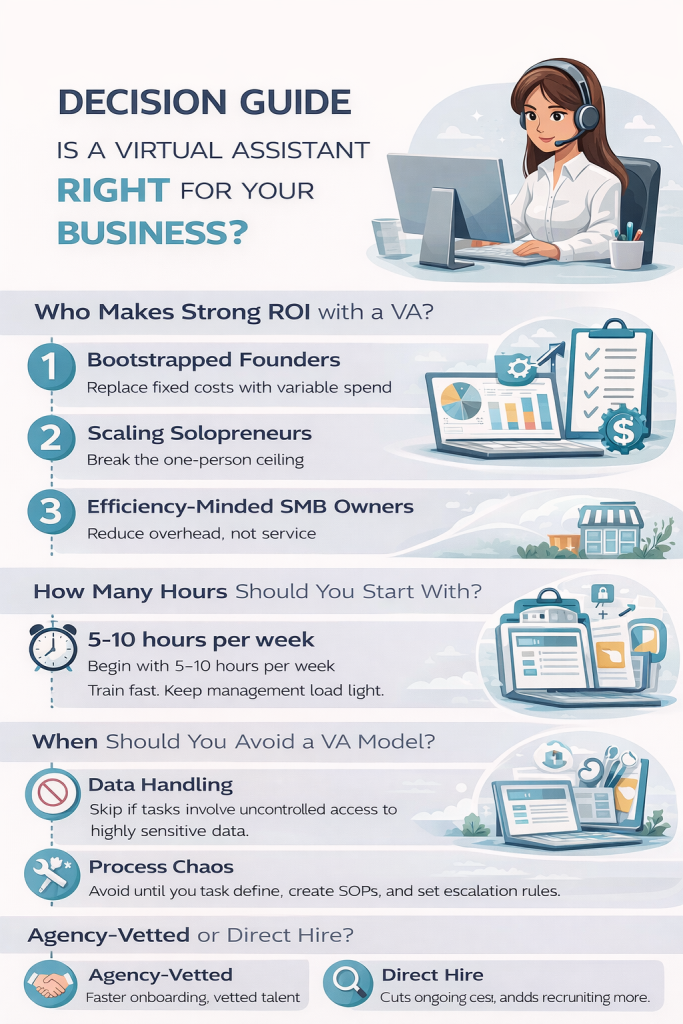
Decision guide
Who usually gets strong ROI from a virtual assistant?
Bootstrapped founders: They protect runway by replacing fixed costs with variable spend.
Scaling solopreneurs: They break the one-person ceiling without building an HR department.
Efficiency-minded SMB owners: They regain margin by shrinking overhead without shrinking service.
How many hours should you start with?
Start with 5–10 hours per week for a first VA. That range gives you enough repetition to train fast while keeping management load reasonable.
Should you hire one general VA or several specialists?
Start with one VA for a clear lane, like admin ops or customer support. Add fractional specialists when you see stable volume, such as lead gen, bookkeeping support, or CRM operations.
When should you avoid a VA model?
Avoid VA support for workflows that require uncontrolled handling of highly sensitive data. Avoid VA support when you cannot define “done,” quality standards, and escalation rules.
Agency-vetted or direct hire?
Agency-vetted talent can reduce screening time and speed onboarding. Direct hire can reduce ongoing cost, but you carry more recruiting and training load.
Read more: Virtual Bookkeeping Assistant Daily Workflow
Common mistakes and fixes
- Mistake: You delegate outcomes without inputs
Fix: Share examples, templates, and a “done” checklist.
Consequence: The VA guesses and you take work back. - Mistake: You hire for a vague role
Fix: Write a one-page scorecard with five outcomes and ten tasks.
Consequence: You pay for motion instead of progress. - Mistake: You skip SOPs
Fix: Record Loom videos for the top tasks and store them in Notion.
Consequence: Training never ends. - Mistake: You measure hours instead of outputs
Fix: Track deliverables weekly and review samples.
Consequence: You reward busyness and lose leverage. - Mistake: You overload tools on day one
Fix: Start with Slack plus one work hub like Asana or Trello.
Consequence: Context switching slows delivery and increases errors. - Mistake: You grant broad access too early
Fix: Use least privilege and password vaults, then expand access only after trust and consistency.
Consequence: One incident can cost far more than savings. - Mistake: You hide the edge cases
Fix: Create escalation rules: when to ask, when to decide, when to pause.
Consequence: Small blockers stall work and kill speed. - Mistake: You never “promote” delegated work
Fix: Move from admin tasks to revenue support over time, like lead follow-up and pipeline updates.
Consequence: ROI plateaus at basic time savings.
Mini case studies
Example 1: The solopreneur who buys back selling time
A consultant handles scheduling, invoicing, and follow-ups. They delegate calendar management, invoice sending, and CRM updates. They reclaim 6 hours weekly.
They redirect that time into two sales blocks and one delivery block each week. That shift creates the return. The VA reallocates time into revenue work.
Example 2: The SMB owner who stops paying for idle time
An operator hires a payroll admin during a busy season, then demand drops. Payroll stays fixed and stress rises. They switch to a VA schedule that expands during peak weeks and shrinks during slow weeks.
That change protects margin because cost follows demand instead of fighting it.
Example 3: The company that speeds up customer response
A growing e-commerce brand struggles with support backlogs. They hire a VA to handle first response, ticket tagging, and returns processing with macros and escalation rules.
Harvard Business Review reported that in a well-known work-from-home study, at-home workers “were not only happier and less likely to quit but also more productive.”
That kind of structured remote work can protect service levels without adding office overhead.

How do I calculate the ROI of hiring a virtual assistant quickly?
The ROI of hiring a virtual assistant equals ((Recovered high-value hours × Hourly value) + Avoided payroll overhead + Gross profit from revenue lift − Virtual assistant cost) ÷ Virtual assistant cost × 100.
- Recovered high-value hours = hours delegated that you stop doing
- Hourly value = your billable rate or profit-per-hour
- Revenue lift = incremental gross profit you can attribute to the VA
- Virtual assistant cost = hourly rate + tools + management time
How much extra cost rides along with payroll hiring?
Payroll hiring overhead includes employer benefits and legally required costs. Employer benefits accounted for 29.8% of total compensation for U.S. private industry workers in June 2025, which equals about 42% of wages on top of salary.
How long does it take to fill a typical nonexecutive role?
Nonexecutive time-to-fill equals 44 days (median) and 54 days (average) in SHRM benchmarking.
What recruiting cost should I assume in my ROI math?
Recruiting cost-per-hire equals EUR 3,935.29 (USD 4,683) as an SHRM benchmarking average, converted using the ECB reference rate EUR 1 = USD 1.1900 (11 Feb 2026).
What tasks should I delegate first for the fastest ROI?
Fastest virtual assistant ROI tasks include:
- Inbox triage with rules
- Calendar scheduling
- CRM cleanup and updates
- Invoice follow-ups
- Support ticket tagging
- Lead list building and cleanup
How do I manage a virtual assistant without adding management stress?
Virtual assistant management uses a simple operating system:
- Weekly scorecard with 3–7 outputs
- Single task hub for all work
- SOPs plus Loom walkthroughs per process
- Escalation rules for “ask” vs “act” decisions
How do I reduce security risk with a virtual assistant?
Virtual assistant security uses control, not trust.
- Least-privilege access per tool
- Separate accounts, not shared logins
- Password manager plus 2FA
- Access audits plus instant offboarding checklist
- Sensitive-system access unlocked only after consistent delivery
Should I hire agency-vetted talent or hire direct?
Agency-vetted virtual assistant hiring optimizes speed and screening reduction. Direct virtual assistant hiring optimizes lower ongoing cost when onboarding and QA stay strong.Next step
If you want a strong ROI from hiring a virtual assistant, run the infrastructure tax math first, then install SOPs and a weekly scorecard.
Book a free consultation at Aristo Sourcing and get matched with a virtual assistant who fits your tools, time zone, and workflow.
