

If you spend more time managing your $5 per hour VA than doing your own work, you do not save money.
You pay a Supervision Tax.
Cheap virtual assistant services rarely fail because the assistant “worked hard.” They fail because the model forces you to carry the thinking, the QA, and the risk.
Many founders start outsourcing because they want leverage. The promise sounds simple: delegate routine work and regain time for strategy, sales, and growth.
Businesses frequently hire virtual assistants to manage repetitive administrative work such as scheduling, inbox management, customer support responses, and data entry so owners can focus on higher-value activities.
But when outsourcing is driven purely by price, that leverage disappears.
Key Takeaways
- Track cost per result, not hourly rate.
- Define the Supervision Tax once, then manage it like a KPI.
- Treat access like a safety system: least privilege, MFA, shared vaults, audit trails.
- Use a paid trial with a rubric, then scale hours.
- Keep client-facing work with vetted support staff who write with nuance.
- Plan continuity from day one with redundancy and clean SOPs.
- Pay for stability, then collect ROI through speed and accuracy.

Why Businesses Look for Cheap or Low-Cost Virtual Assistants
For startups and small businesses, hiring help often begins with a budget constraint.
Many companies search for low-cost virtual assistants because they want operational support without the overhead costs of hiring full-time employees, office space, equipment, and benefits. Remote assistants allow businesses to scale support more flexibly while controlling payroll expenses.
This logic makes sense on the surface.
If a task costs less to outsource than to perform internally, outsourcing appears to be the obvious decision.
However, price alone rarely reflects the true cost of operational support.
Why This Matters Now
Every correction steals time from revenue work. Every extra Slack message drains focus. That pattern carries a cost even when the numbers look small.
Researchers found people reported significantly higher stress, frustration, workload, effort, and pressure after only 20 minutes of interrupted work. Cheap outsourcing often creates that interruption pattern through constant clarifying, correcting, and chasing.
That stress also signals opportunity cost. You lose the hours you planned to spend on sales, delivery, strategy, or deep work. The core model below helps you price that loss.
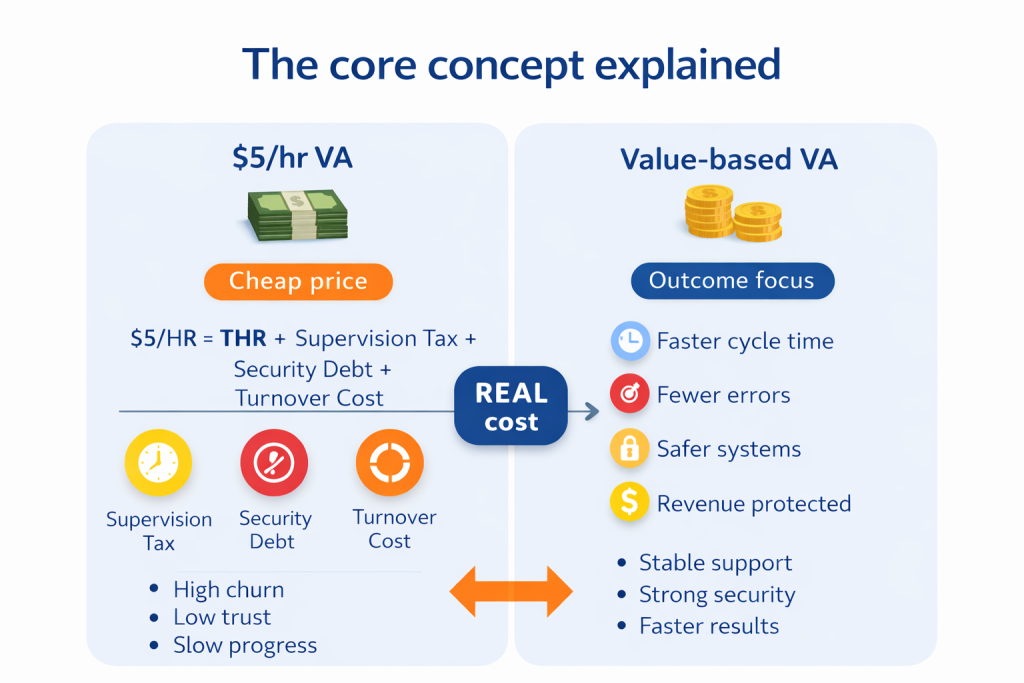
The core concept explained
Cheap rarely equals low cost
Founders buy leverage, not labor.
Leverage shows up as clean output, fewer decisions, and faster cycle time inside tools like Google Workspace, Slack, HubSpot, Salesforce, Zendesk, Intercom, and QuickBooks.
Cheap virtual assistant services are often priced by the hour and ignore the outcome. A better model uses ROI of delegation:
- Hours saved per week
- Errors prevented
- Cycle time reduced
- Revenue protected through better support
An affordable virtual assistant improves workflow efficiency by taking over repetitive operational work that otherwise slows down business owners. This includes administrative coordination, customer communication, and routine process management.
When those workflows run smoothly, founders regain decision bandwidth.
The Supervision Tax model
Supervision Tax = the time you spend explaining, correcting, and chasing.
Use a simple calculation to expose the real price:
True Hourly Rate (THR)
THR = (VA hours × VA rate) + (Your correction hours × your rate)
A $5 per hour invoice can hide a $100 per hour correction habit. That habit turns outsourcing into a second job.
Example:
A founder hires a $5/hour VA.
20 hours/week × $5 = $100
But the founder spends 6 hours correcting work.
If the founder’s time is worth $150/hour, supervision costs $900/week.
True weekly cost becomes:
$1,000/week.
That is before missed deadlines, dropped follow-ups, and constant interruptions.
People Also Ask: What makes cheap virtual assistant services expensive?
Supervision drives the cost. Rework also delays projects, which compounds opportunity cost when revenue work waits.
The Security Debt problem
Cheap hiring often comes with weak controls: personal devices, copied passwords, shared logins, and broad access. Those shortcuts create Security Debt.
IBM’s Cost of a Data Breach Report 2024 put the global average breach cost at USD 4.88 million and described a sharp rise driven by disruption and response costs.
Most small firms never face a headline breach. Small incidents still hurt. A stolen client list, a hijacked inbox, or a compromised billing login can trigger refunds, chargebacks, and reputational damage.
Start with the simplest control that prevents the biggest mess: least privilege. NIST defines least privilege as restricting access privileges to the minimum necessary to accomplish assigned tasks.
Then layer practical controls that match real remote operations:
- Role-based access control (RBAC) inside Google Workspace and your CRM
- Multi-factor authentication (MFA) on every account
- Shared vault access through 1Password, Dashlane, or LastPass
- Separate logins per user, never shared logins
- Audit trails on sensitive systems
- Clear rules for data handling and storage
People Also Ask: Can I outsource admin work safely?
Yes. Lock down access, use a shared vault, require SOPs, and add approvals for sensitive actions.
Data privacy and compliance, in plain English
Many businesses handle personal data, payment data, or client documents. That reality pulls in basic compliance expectations:
- GDPR: an EU privacy law that controls how companies collect and use personal data.
- SOC 2: an audit framework that checks security controls in service companies.
You do not need a legal degree to act smart. Treat privacy like an operations standard: limit access, log changes, and control where data lives.
People Also Ask: Do NDAs protect me when I hire internationally?
An NDA helps, but access controls matter more day to day. Lock down systems first, then add legal protection.
The stability gap
Ultra-low rates push survival mode. Survival mode drives multitasking, client overload, and churn. Your business then pays the retraining bill and loses context.
Survival mode leads to:
- multitasking across many clients
- inconsistent availability
- rushed work
- high turnover
Businesses that hire extremely low-cost assistants often experience instability because those assistants must juggle multiple clients to maintain income. This frequently leads to missed details, slower responses, and inconsistent output.
Gallup estimates replacement costs around 200% of salary for leaders and managers, 80% for technical roles, and 40% for frontline roles.
Support roles often sit closer to frontline and professional bands. The direction matters: churn costs money through lost time, broken workflows, and stalled projects.
People Also Ask: How do I reduce VA turnover?
Pay for stability, set clear expectations, and build a cadence that makes success obvious.
Cheap vs Affordable Virtual Assistants
There is an important distinction between cheap and affordable support.
Cheap support focuses only on price.
Affordable support focuses on value and reliability.
Affordable virtual assistants help streamline daily workflows by handling administrative and operational tasks consistently, allowing businesses to improve efficiency and focus leadership time on growth activities.
The difference becomes visible through outcomes:
Cheap assistants often require supervision.
Reliable assistants reduce supervision.
And reduced supervision equals leverage.
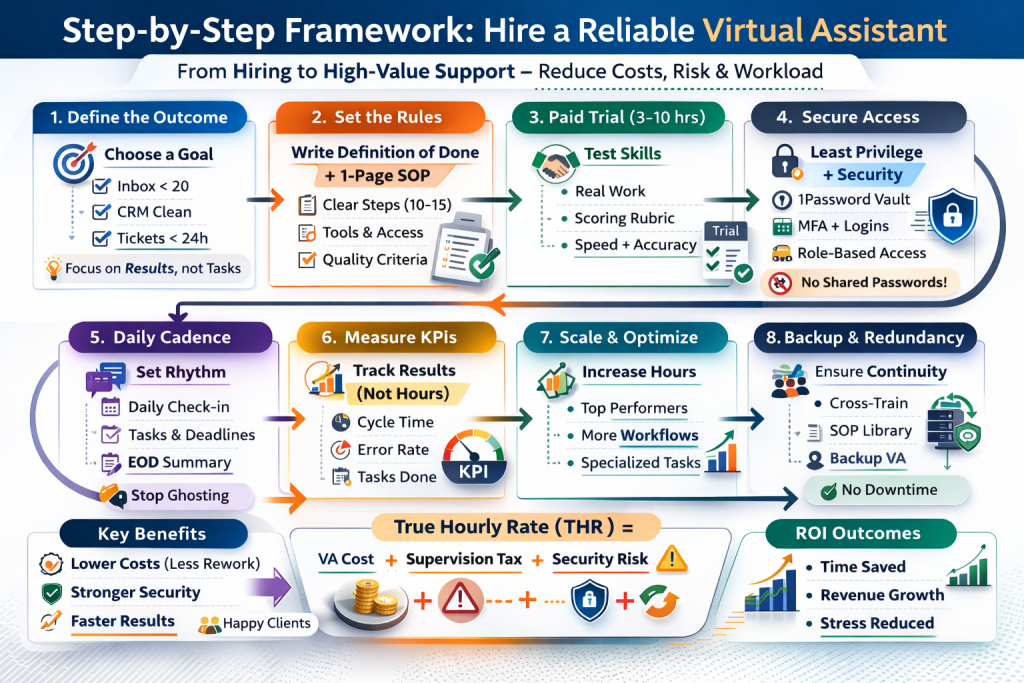
A Framework for Hiring Virtual Assistants
- Choose an outcome, not a title
What to do: Pick a measurable outcome like “inbox under 20,” “CRM clean,” or “tickets resolved within 24 hours.”
Why it matters: Outcomes prevent task sprawl and reduce decision fatigue.
Quick example: Assign a support assistant a Zendesk queue with an SLA and escalation rules and focus on outcomes- inbox under 20 emails
- CRM updated daily
- tickets resolved within 24 hours
- Write a definition of done
What to do: Add acceptance criteria and one example of great output.
Why it matters: Criteria cut rework and confusion.
Quick example: “Publish blog post” becomes “format headings, add internal links, add featured image, schedule, then send preview link.” - Build a one-page SOP
What to do: Create a short SOP with 10 to 15 steps in Notion or Google Docs.
Why it matters: Short SOPs stay current and get used.
Quick example: Document “lead follow-up” with exact templates and the HubSpot fields that must update. - Run a paid trial with a rubric
What to do: Pay for 3 to 10 hours of real work. Score speed, accuracy, and communication.
Why it matters: Trials reveal fit faster than interviews.
Quick example: Ask for a CRM cleanup report: duplicates removed, fields normalized, notes logged. Score:- accuracy
- speed
- communication
- Trials reveal fit faster than interviews.
- Set access rules before work starts
What to do: Use a password manager vault, MFA, and least privilege permissions.
Why it matters: Access mistakes scale fast. Moreover, security should never be an afterthought.
Quick example: Share one Google Drive folder by role, then grant edit access only when needed. - Install a daily operating cadence
What to do: Require a start-of-day plan and end-of-day summary.
Why it matters: Cadence removes ghosting anxiety and prevents drift.
Quick example: A Slack update with three priorities, blockers, and completed tasks. - Measure output with simple KPIs
What to do: Track cycle time, error rate, and completion rate.
Why it matters: Output metrics reward results, not busywork.
Quick example: Track tickets closed, first response time, and reopen rate. - Build redundancy for critical workflows
What to do: Cross-train a backup or hire through a managed model that provides coverage.
Why it matters: Illness, outages, and life happen.
Quick example: Record a Loom walkthrough for onboarding steps so another assistant can step in.
Cheap VA vs Managed Support
Cheap freelancers can work when:
- tasks are low risk
- SOPs already exist
- supervision is minimal
Managed support works better when:
- continuity matters
- QA matters
- security matters
- client communication matters
Many businesses prefer vetted outsourcing providers because those firms screen candidates, verify experience, and ensure the assistant is capable of performing the required tasks before introducing them to clients.
Vetting reduces hiring risk.
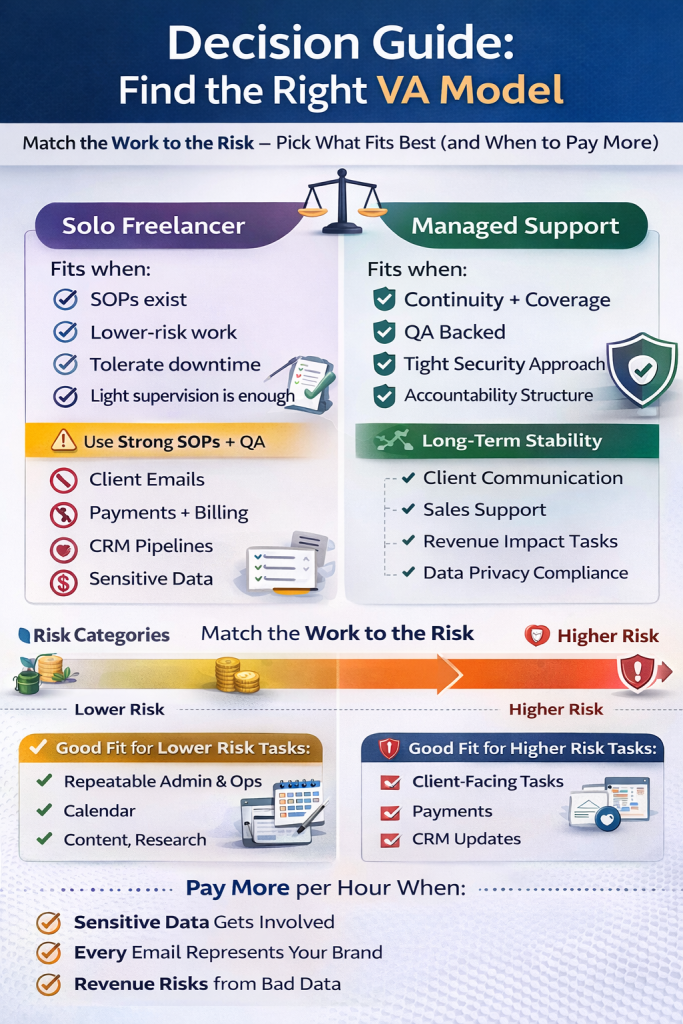
Decision guide
Match the work to the risk
Cheap virtual assistant services can work for low-risk tasks with tight rules and clean inputs.
Lower-risk tasks
- Data entry with validation rules
- Calendar scheduling with hard constraints
- Content uploads with a checklist
- Simple research with sources required
- Support tagging and routing inside a helpdesk
Higher-risk tasks
- Client-facing email replies in your voice
- Billing, refunds, payments, or PCI-related workflows
- CRM pipeline updates that affect forecasting
- Work tied to regulated data or privacy obligations
- Work that can damage trust with one message
People Also Ask: Which tasks should a virtual assistant handle first?
Start with repeatable admin and ops tasks that create daily drag: inbox triage, scheduling, follow-ups, CRM hygiene, and support routing.
Solo freelancer vs managed support
Solo freelancer fits when
- SOPs already exist
- Work stays low-risk
- You can tolerate downtime
- You can supervise lightly
Managed support fits when
- You need continuity and coverage
- You need QA on client-facing work
- You want stronger accountability
- You need tighter security practices
Use a bucket of hours instead of full-time cheap
A business often needs a strong part-time operator more than a full-time generalist. Ten hours of specialized support can beat forty hours of low-cost generalist time when the work touches revenue, client trust, or data quality.
Here’s the simple comparison that explains the psychology and the math:
| Task Type | Low-Cost Generalist (40 hrs) | Specialized Support (10 hrs) |
|---|---|---|
| CRM hygiene | High error rate, manual entry | Clean data, automated workflows |
| Customer email | Scripted, robotic tone | Nuanced, brand-aligned tone |
| Supervision needed | 5 to 10 hours per week | Under 1 hour per week |
| Outcome | More noise | More revenue |
This model also fits specialized support roles:
- Executive assistant support
- Customer support staff
- Sales support and lead management
- Operations coordinator support
- Research assistant support
- Bookkeeping support that preps clean work before a CPA reviews
Common mistakes and fixes
Cheap hiring fails for predictable reasons. Most failures start with unclear scope, weak operating rhythm, or sloppy access. Fix those three, then evaluate talent.
- You hire on price instead of proof
Fix: Require a paid trial and a scoring rubric.
Consequence: You buy confidence, then you pay for rework. - You delegate tasks without context
Fix: Add the “why” in one sentence, then share one example of great output.
Consequence: The assistant follows steps and misses intent. - You skip acceptance criteria
Fix: Write a definition of done with three checks.
Consequence: You approve work emotionally, then regret it later. - You hand out broad access on day one
Fix: Apply least privilege, MFA, and separate logins.
Consequence: One mistake can trigger a messy cleanup. - You share passwords through chat or email
Fix: Use a shared vault and grant access without revealing the password.
Consequence: A leaked credential can trigger weeks of resets and risk. - You accept “yes” instead of understanding
Fix: Ask for a written plan that restates the task, risks, and next actions.
Consequence: The assistant starts wrong, then you pay to unwind the work. - You track hours instead of outputs
Fix: Track cycle time, error rate, and completion rate.
Consequence: You reward slowness and hide performance gaps. - You ignore continuity planning
Fix: Cross-train, document, and record Loom walkthroughs.
Consequence: One departure can freeze a workflow for weeks. - You place cheap help on client-facing communication
Fix: Use vetted support staff who write with nuance and follow brand rules.
Consequence: One awkward email can signal “cheap” to a premium client.
Mini case studies
Case 1: The solopreneur who bought “help” and got a second job
A consultant hired low-cost help for inbox and scheduling. The assistant followed steps but missed nuance. The consultant spent an extra hour a day correcting messages and fixing calendar errors.
The consultant switched to vetted support staff who owned the workflow: triage rules, follow-up templates, and a daily summary. The consultant regained deep work blocks and shipped client work on time.
Case 2: The micro-manager who rebuilt trust with a trial rubric
A founder delegated content publishing. The assistant posted drafts with broken formatting and missing internal links. The founder pulled the work back and lost momentum.
The founder ran a paid trial with one post, one checklist, and one rubric. The assistant delivered clean output, then documented the workflow. The founder regained time and stopped hovering over WordPress.
Case 3: The founder who treated access like a system
A small agency gave a freelancer broad access to shared folders and credentials. The agency later noticed unusual activity and rotated passwords in a panic.
The agency moved to least privilege permissions, vault-based credentials, and MFA. NIST’s definition of least privilege matched the new operating standard: limit access to what the job requires.
The agency also reduced stress and regained control through audit trails and role-based folders.

Are cheap virtual assistant services worth it?
Cheap virtual assistant services are worth it for low-risk, repeatable tasks with written SOPs and clear acceptance criteria. Cheap virtual assistant services are not worth it for client-facing communication, payments, refunds, or reputation-sensitive work. Cheap virtual assistant services require task checklists, sample outputs, QA checks, and restricted access.
Cheap VA fit
- Cheap VA work: data entry, list building, inbox triage with rules, calendar scheduling, formatting, research briefs with sources.
- Cheap VA avoid: sales calls, billing, refunds, brand voice replies, crisis handling, client communication,, senstive data, and decision-making.
Cheap support works only when tasks are:
- low risk
- repeatable
- clearly documented
What rate counts as “too cheap” for a virtual assistant?
A “too cheap” virtual assistant rate is a rate that cannot fund sustainable, focused work. A “too cheap” virtual assistant rate equals survival-mode pricing, and survival-mode pricing produces slow replies, overbooking, missed details, and churn.
Too-cheap test (use EUR)
- Sustainable hourly rate = (monthly costs + taxes + buffer) ÷ billable hours
- Example: (EUR 900 + EUR 100 + EUR 100) ÷ 120 = EUR 9.17/hour
- “Too cheap” rate = any rate below the sustainable hourly rate.
How do I share passwords safely with a remote assistant?
Password sharing with a remote assistant is safe when no password is ever sent in chat. Password sharing requires a password manager vault, unique logins per user, and MFA on every account. Password sharing also requires least-privilege access, audit logs, and instant revoke procedures.
Password sharing rules
- Password manager vault access, not copied credentials
- Separate user accounts, not shared master accounts
- MFA + backup codes stored securely, not in messages
- Permission scopes limited to the exact task
Do NDAs protect me when I hire internationally?
An NDA protects you after damage through legal leverage. Access controls protect you before damage through prevention. International hiring works when systems lock-down comes first, and NDAs come second.
Order of protection
- Access controls (roles, permissions, device rules)
- Monitoring (audit trails, alerts)
- NDA (jurisdiction, remedies, confidentiality scope)
Should I hire a general VA or specialized support staff?
A general virtual assistant fits standard admin workflows. Specialized support fits revenue, customer experience, or technical workflows. The workflow that “bleeds time” decides the hire, and the workflow that “touches revenue” decides specialization.
Decision rule
- General VA: scheduling, admin ops, basic coordination
- Specialized support: customer support, ads ops, bookkeeping support, CRM ops, content ops
How do I stop ghosting?
Ghosting stops with explicit response SLAs, daily cadence, and output tracking. Ghosting also stops with redundancy for critical workflows, because single points of failure create downtime.
Anti-ghosting system
- Response SLA: “Reply within X hours during working hours”
- Daily check-in: start-of-day plan + end-of-day delivery
- Output tracker: tasks, due dates, proof links, status
- Backup plan: second VA or documented handoff notes
Can a remote assistant handle customer support?
Remote assistants handle customer support when support runs on scripts, escalation rules, and QA checks. Customer support success requires templates, tone rules, and defined refund/billing boundaries. Billing access stays behind strict permissions and owner-only approval.
Customer support controls
- Scripts + macros
- Escalation matrix (when to escalate, to whom, within what time)
- QA sampling (daily/weekly review)
How can I tell if a VA will need heavy supervision?
A VA needs heavy supervision when the VA asks few clarifying questions and starts work with no checklist. A strong VA asks about edge cases, confirms priority rules, and proposes a checklist + acceptance criteria before execution.
Trial signals
- Strong VA: questions about exceptions, definitions, and quality checks
- Weak VA: immediate execution, vague updates, no proof links
How do I measure ROI from a virtual assistant?
Virtual assistant ROI equals value gained minus true cost. Virtual assistant ROI tracking uses hours saved, cycle time, error rate, and customer response speed. Virtual assistant ROI comparison uses the true hourly rate, not the invoice rate.
True hourly rate (THR)
- THR = invoice rate + tool costs + management time cost + rework cost
- ROI proof = (hours saved × your hourly value) − (THR × VA hours)
Your original answers: what’s wrong (and yes, you need to improve)
- Weak snippet triggers. You bury the key constraints (access, reputation, billing) instead of leading with them.
- Snippet structure failure. Your answers don’t repeat the question in the first sentence consistently, so Google extracts nothing cleanly.
- Format inconsistency. You mix paragraph advice with scattered rules, so the page has no single “pull quote” unit.
- Ambiguity problem. “Survival mode” and “THR” appear with no definition, so the meaning is not standalone.
- Missing acceptance criteria. You mention SOPs but you don’t specify what “done” means, so the guidance stays abstract.
Next step
Cheap virtual assistant services can help when the work stays low risk and the system stays tight. The moment you need trust, stability, and clean outputs, choose vetted virtual assistants and support staff who operate inside your tools with discipline.
Book a free consultation with Aristo Sourcing and bring:
- The top five tasks you want off your plate
- The tools involved, like Google Workspace, Slack, HubSpot, Salesforce, Zendesk, or QuickBooks
- One weekly outcome you want in numbers, not feelings
